DLTK's Holiday Crafts for Kids
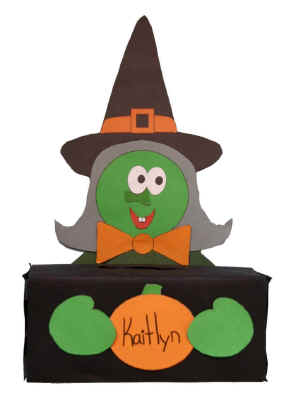 Witch Box for Halloween
This craft if made with a rectangular Kleenex box resulting in an adorable witch eager to hold any cards or small treats this Halloween.
You can replicate the same type of craft using craft foam instead of paper by tracing the template pieces onto foam and drawing on a few of the details.
It turns out really cute just with paper though -- the directions assume you'll be doing it just with paper.
Materials:
- paper,
- glue,
- scissors,
- small empty box (we use kleenex boxes and shoe boxes)
- construction paper
- Optional: thin cardboard (empty cereal boxes
work well).
- Optional: large wiggly eyes
Instructions:
- Print out the template of choice and color them as appropriate.
- Wrap the empty box up with construction paper (or gift wrap) in an appropriate color (black or green would work) or you could paint it with acrylic or poster paint.
- Cut a slit in the top of the box large enough to fit typical Halloween treats (small chocolate bars, suckers, etc).
- NOTE: You could also just cut the entire top off the box or use a no-top box like a shoe box.
- Optional: Glue the templates to pieces of thin cardboard and let dry.
- Cut out the template pieces.
- Print the child's name on the large pumpkin (template 1).
- Glue pieces together:
- Head shape (template 1) should go on shoulders (template 2)
- Glue the hat behind the head
- Glue the eyes, nose and mouth (template 1) on the head
- Glue the bow (template 2) under the chin
- Glue the whole body onto the back of the box, facing over the top (so it looks like he's sitting behind the box, holding it... See picture at the top of this page if you don't understand).
- Glue the pumpkin (template 1) onto the front of the box
- Glue the hands (template 2) to the front of the box, overlapping the pumpkin slightly.
Templates:
- After printing, close the template window to return to the main page.
- If the template doesn’t fit on one page, adjust your printer margins:
• In most browsers: Print → More settings → Margins → Minimum
• Or use Page Setup / Printer Setup in your printer dialog
Template 1 (head) (color) or (B&W)
Template 2 (body) (color) or (B&W)
Template 3 (hat) (color) or (B&W)
Printable version of these instructions